Make a video with Sauna and Higgsfield
Connect Higgsfield, paste in the skill, and tell Sauna what to make. Two finished films and the full prompts to get you started.
TL;DR
You can make videos like the two below inside Sauna. Set up your brand and tools once, then let Sauna handle production.
- Create a brand skill. Give Sauna your landing-page URL so it can collect your logos, colours, fonts, and product assets.
- Connect Higgsfield. Paste the MCP link into Sauna and finish connecting your account.
- Add the video skill. Copy the full skill below into Sauna, or attach the file.
- Pick an example and adapt its prompt. Approve the script, storyboard, and generation cost before Sauna makes the film.
We connected Higgsfield to Sauna and made a 66-second film about our product. Sauna wrote the script, generated the shots, added narration, and assembled the cut. Nobody opened an editor.
Here is the setup, followed by both finished films and their full prompts. You can copy everything you need directly into Sauna.
1. Create your brand skill
Before you make a film, give your agent a reliable place to find your brand. Create a landing page on your own domain, or a dedicated brand page, that Sauna can access. Keep your logo, colours, typography, product images, and current messaging there so it can pull the right resources instead of guessing.
You can also turn those resources into a reusable brand skill. Paste your landing-page URL into Sauna with this prompt:
Go to my landing page, pull up all the brand assets, and create a skill with all of the details of this.

My landing page: [paste your URL here]
Have Sauna include the original asset links, colour values, font names, and guidance on how to use them. Check the result once, fill in anything the page does not provide, and ask Sauna to use this brand skill alongside the Higgsfield video skill whenever it makes a film for you.
2. Connect Higgsfield
Copy this MCP link and paste it into a Sauna chat. Ask Sauna to connect Higgsfield. Sauna will handle the setup and guide you through any sign-in needed to finish connecting your account.
https://mcp.higgsfield.ai/mcpMCP is the connection that lets Sauna use Higgsfield’s image and video tools from your conversation. Once connected, you can ask Sauna to make the film in that same chat.
3. Give Sauna the video skill
This is the file that makes the workflow repeatable. It teaches Sauna how to plan the film, write the motion prompts, choose a model, and avoid the mistakes that waste credits.
Click Copy skill and paste the whole thing into Sauna. Or download the Markdown file and drop it into the chat. Tell Sauna to use it for your video work; Sauna will deal with the rest.
---
name: higgsfield-mcp
description: Generate video and images through the Higgsfield MCP. Use whenever the user wants a video, animation, motion graphic, explainer, ad, product film, launch film, storyboard, or a still image that has to look filmed or rendered, and whenever they say "animate this", "make a video of", "Higgsfield", "Seedance", "Kling", "Nano Banana", or drop a reference clip and say "like this". Covers the connection, the script gate that must happen before any generation, the storyboard-first workflow, the model choice (Seedance 2.5 by default), every call shape that actually validates, and the failure modes that waste credits. Not for editing footage the user already has, and not for anything whose value is letter-perfect text or real product UI.
---

# Higgsfield MCP

Higgsfield is a generative video and image platform. The MCP puts around thirty models behind one connection: Seedance 2.5, Kling 3.0, Sora 2, Veo 3.1, MiniMax H3, Nano Banana Pro, plus roughly a thousand Marketing Studio presets.

Every generation costs credits and takes minutes. The two rules below exist because of that.

## Rule 1: lock the script with the user before you generate anything

This is the rule that saves the most money and the most of the user's patience. A video is expensive to change and a sentence is free to change, so all the disagreement should happen while it is still sentences.

When someone asks for a video, do not open the MCP. Write the script and the shot list, show it to them, and get it agreed. Ask for what only they can tell you:

- What is the one thing a viewer should remember? One sentence, in their words.
- Who is watching, and where does it play?
- Is there real footage or a real product, or is every frame invented?
- What exact words appear on screen? Get them quoted, spelled the way they want them.
- What must not appear?
- Roughly how long? For explainers, sixty to ninety seconds is the researched sweet spot, and the first five seconds carry the viewer's problem rather than the product.

Then write the narration in full and hand it back before generating. Read it out loud in your head with a timer. Narration is the clock: shot lengths follow the spoken words, never the other way round.

Push back when the brief is thin. "I need one line on what they should remember and the exact on-screen copy, then I will build it" is a better message than a rendered video the user did not want. If they will not engage, generate ONE cheap storyboard image and let that be the thing they react to.

Signs you skipped this gate: you are on your third full render, the feedback keeps arriving as taste rather than specifics, and each pass costs ten minutes of generation. That is a script problem wearing a video costume.

## Rule 2: storyboard as an image before you generate video

One image is a fraction of the price of one clip and catches almost everything: spelling, layout, identity, palette, whether the idea reads at all.

Generate the whole board as a single image, a grid of 16:9 panels, with every on-screen word written out in quotes inside the prompt. Show it to the user. Fix it at the image stage. Then crop each panel to 1920x1080 and pass it as the `start_image` for that shot, so the video model animates an approved frame instead of inventing one.

```
generate_image {"params":{
  "model":"nano_banana_pro",
  "prompt":"A 9-frame storyboard sheet laid out as a 3 by 3 grid of equal 16:9 panels with thin gutters ... Panels in reading order: 1) ... headline 'EXACT WORDS'. 2) ... All text spelled exactly as written, nothing else printed anywhere.",
  "aspect_ratio":"16:9","resolution":"4k","use_unlim":false}}
```

### Which image model

Two candidates, and they are good at different things.

**`gpt_image_2` is the better choice when the storyboard is carrying words.** Independent comparisons through 2026 put it well ahead on text rendering, around 99 percent character accuracy against roughly 80 to 95 percent for Nano Banana Pro, and it holds up on dense, small, or multi-region text where Nano Banana starts swapping characters and inventing strings. It plans the layout before rendering, so it also follows complex multi-element instructions more faithfully. Set `resolution` and `quality` explicitly, because both default to the cheapest tier.

**`nano_banana_pro` is the better choice when the frame needs consistent people.** It accepts many reference images, holds several characters in one scene, renders native 4k, and is stronger on photoreal texture. It is also the model that honours Higgsfield's trained-identity placeholders, so if you are dropping `<<<element_id>>>` into a prompt to keep the same face across every panel, that is the Nano Banana route.

So a storyboard with dense copy and no recurring characters goes to GPT Image 2. A storyboard whose whole point is the same five faces in every panel goes to Nano Banana Pro. When you need both, the honest answer is to split: lay out the text-heavy panels on GPT Image 2, generate the character panels on Nano Banana Pro, and accept that the two will not match perfectly. Verify the identity-placeholder behaviour on GPT Image 2 before relying on it; the catalog does not list it.

Either way, read the rendered text before you spend a credit on video. That is the entire reason this step exists.

## Model choice

**Default to `seedance_2_5`.** Tested head to head against `kling3_0` on the same start frame, same prompt, same thirteen seconds: Seedance held every printed label for the whole clip, Kling drifted a duplicate misspelled word into the frame. For anything carrying typography, Seedance is the safer model.

| Model | Reach for it when | Limits worth knowing |
|---|---|---|
| `seedance_2_5` | Default. Anything with text, anything longer than fifteen seconds, anything needing an explicit 1080p | 4 to 30s. `mode`: `t2v`, `omni_reference`, `video_edit`, `video_extension`. `resolution`: 480p / 720p / 1080p. `generate_audio` defaults true, so turn it off when you are adding your own sound |
| `kling3_0` | Motion transfer, multi-shot, or when you want more aggressive movement and the text is two or three words | 3 to 15s. `mode`: `std` / `pro` / `4k`. `sound`: `on` / `off` |
| `gpt_image_2` | Storyboards and stills where the text has to be right. OpenAI's model, and the current leader on typography | Image model. `resolution`: 1k / 2k / 4k, `quality`: low / medium / high, and **both default low**, so set them explicitly |
| `nano_banana_pro` | Stills needing several consistent characters, trained identity placeholders, or photoreal texture | Image model. `resolution`: 2k or 4k. Native 4k, multi-reference identity |
| `minimax_h3` | 2K keyframes, mixed references | |
| Marketing Studio presets | Product ads, UGC, hypermotion food and product films, SaaS launch films | `show_marketing_studio_v2(category)`, `marketing_studio_v2_presets`, `marketing_studio_v2_create`, `marketing_studio_v2_status` |

Confirm parameters against the live catalog rather than this table: `models_explore {"action":"get","model_id":"seedance_2_5"}`. Use `action: "recommend"` with a plain-language query when you are unsure. `details` is not a valid action.

Seedance's motion is gentler than Kling's. A travelling dot or a subtle reveal can read as too quiet, so describe the motion with more force in the prompt than feels necessary.

## The economics, and why they should change your behaviour

An image is roughly thirty times cheaper than a clip. Preflighted on a real account with `get_cost: true`:

| Call | Credits |
|---|---|
| `nano_banana_pro`, 2k | 2 |
| `nano_banana_pro`, 4k | 4 |
| `gpt_image_2`, 2k medium | 2 |
| `gpt_image_2`, 2k high | 6.5 |
| `gpt_image_2`, 4k high | 11 |
| `kling3_0`, 13s pro | 22.75 |
| `seedance_2_5`, 5s 720p | 32.5 |
| `seedance_2_5`, 5s 1080p | 45 |
| `seedance_2_5`, 13s 1080p | **117** |

One 4k storyboard sheet costs 4 credits. One thirteen-second Seedance clip costs 117. **You can iterate the storyboard twenty-nine times for the price of a single clip**, so spend freely at the image stage and treat every video call as the expensive, near-final step. Regenerating a sheet four times to get the copy and layout right is a rounding error; regenerating four clips is not.

This also reframes the model choice. Seedance is about five times the price of Kling at the same duration (117 against 22.75), so "default to Seedance" is a quality decision that costs real money. It is still the right default when text is on screen, because one drifted label means regenerating anyway. When the frame carries almost no text and you want aggressive motion, Kling at a fifth of the price is the better trade.

Check prices against the account rather than this table, since they move: `get_cost: true` on any request preflights it without spending, and `balance` returns the credit total.

Two more consequences worth acting on:

- **Storyboard at 4k, generate at the duration you actually need.** Seedance is priced per second, so a thirteen-second shot costs more than twice a five-second one. Cut the shot to the narration line rather than padding it.
- **Composite instead of regenerating.** A frame you draw locally costs nothing and can be fixed indefinitely. That is a second argument for keeping diagrams and text panels out of the video models entirely.

## When not to use a video model at all

Generative video is the wrong tool for a diagram, a table, a chart, real product UI, or any frame whose whole job is exact text. It will smear labels and invent characters in empty space.

Composite those frames locally instead, with Pillow and ffmpeg, and cut them into the timeline alongside the generated shots. A hybrid film is normal and usually the right answer: generated footage for anything that should look filmed or hand-made, locally rendered frames for anything that has to be readable and correct.

## Prompt shape that works

Two blocks, always, then the shot description.

```
Animation of this exact frame. Camera locked: no zoom, no pan, no cuts.
Every printed word stays exactly as printed, sharp and unchanged; no new
text, letters or logos ever appear.

HARD RULE ON FACES: every human face is a still printed cutout. Faces never
change: no mouth movement, no talking, no blinking, no expression change, no
morphing. The only motion a head may make is the whole rigid cutout rocking
left and right a few degrees like a quick head shake.

<what actually moves, in order, with a pace word at the end>
```

The face rule is not optional. Video models animate mouths by default, and a paper cutout or an illustration whose mouth starts moving reads as uncanny immediately. If a character needs to react, the whole head tilts or nods.

Add "no new objects, no new people, no new faces appear anywhere; the empty space stays empty" when a frame has open background. Models fill empty space with invented figures.

## Call shapes that validate

```
generate_video {"params":{
  "model":"seedance_2_5","mode":"omni_reference",
  "prompt":"<the two blocks plus the shot>",
  "duration":13,"resolution":"1080p","generate_audio":false,
  "aspect_ratio":"16:9","use_unlim":false,
  "medias":[{"role":"start_image","value":"<media_id>"}]}}
```

- Batch: `generate_video_batch {"requests":[{"index":0,"params":{...}}, ...]}`, two to twelve requests, `index` required on each. Same for `generate_image_batch`.
- Poll: `jobs_wait {"jobs":[{"index":0,"job_id":"..."}]}`. `index` is required here too. It returns early with `timed_out: true` and a `poll_after_seconds`, so loop until `all_terminal: true` rather than trusting the first response. A thirteen-second 1080p clip took a little over a minute.
- Results arrive as `result_url` or `results.rawUrl` on each finished job.
- `medias[].value` must be a `media_id` or `job_id`, never a raw URL.
- Always pass `use_unlim: false` explicitly, otherwise the server asks a question instead of starting a job.
- Preflight a video with `get_cost: true` when the user cares about spend. `balance` returns the credit total.

### Getting a local file in

```
media_upload {"files":[{"filename":"panel.png","content_type":"image/png"}]}
```

Returns an `upload_url` and a `media_id` per file. PUT the bytes to that URL, then confirm:

```bash
curl -X PUT -H "Content-Type: image/png" -H "X-Sauna-Connection-Id: none" \
  --data-binary @panel.png '<upload_url>'
```

```
media_confirm {"type":"image","media_ids":["..."]}
```

The `X-Sauna-Connection-Id: none` header matters. The upload URL is a presigned S3 link and an injected credential breaks it. The same header is needed when downloading a result with curl.

For media already on the web, use `media_import_url(url)` instead.

## The failure that will cost you a batch

`generate_video` and `generate_video_batch` sometimes refuse to submit and return `notice.type: "preset_recommendation"`, or in a batch `status: "submission_failed"` with "Preset X was recommended instead of submitting a job". Nothing was queued and nothing was charged.

The response carries `retry_literal_with: {declined_preset_id}`. Put that id inside `params` on every request and resubmit:

```json
{"params":{"model":"seedance_2_5", "...":"...", "declined_preset_id":"<id from the notice>"}}
```

Rewording the prompt does not help. Switching models does not help. This is the only fix.

## Sound

The MCP's `generate_audio` tool is text to speech only. It declines music and general sound effects. Higgsfield music arrives only inside a video render, written into the prompt as music and soundscape blocks.

For a film you are assembling yourself, generate narration, music and effects separately (ElevenLabs is the usual route) and mix in ffmpeg. Two things that matter:

- One narration file per shot, placed at an absolute offset. Do not rely on a single long file with per-scene start offsets, and do not stretch narration to fit a shot. Cut the shot to the line, with a small amount of head and tail room, and quantize every length to whole frames before computing the next start.
- Keep music well under the voice and duck it during speech.

## Verify before you hand it over

- Look at frames from the rendered file, not at the storyboard you started from. A contact sheet of one frame per shot catches drift in seconds.
- Transcribe the exported soundtrack and read it. Checking for silence is not enough, because music masks a missing or clipped line.
- Confirm duration, dimensions and frame count off the finished file.
- Never invent a number, a timestamp or a metric inside the artwork. If a frame shows a fact, it has to be a fact.

## Connection

`https://mcp.higgsfield.ai/mcp`, added through the MCP connection flow. Verify with `mcp list '<url>' --schema` before the first real call, then pass the connection on every request. The older REST surface at `platform.higgsfield.ai` still works but the MCP is the primary route.

Other tools worth knowing: `video_analysis_create` reverse-engineers a reference video into a prompt, `motion_control` copies a camera move from a driving clip, `reframe` changes aspect ratio, `upscale_video`, `remove_background`, `show_characters` trains a reusable identity from five to twenty photos, and `get_workflow_instructions(workflow)` ships bundled playbooks.

For identity across shots, train a character or element once from real photos and reference it in every prompt. Candid photographs train better identities than retouched studio portraits, which teach the model the retouching instead of the face.
The skill makes Sauna stop at two useful checkpoints: agree the script, then agree one storyboard image. You make the creative decisions while changes are still cheap.
4. Pick a film to make
Start with a short single-prompt film to try the connection. For a longer explainer with real information, use the storyboard-and-assembly approach from our film.
A short film from one prompt
This is Higgsfield’s example of an editorial explainer: why your recorded voice sounds unfamiliar. One detailed prompt describes the story, visual style, cuts, text, and audio.
SCENE AND STORY
Create a richly colored, boldly composed editorial mixed-media science short with a rhythm full of surprises, explaining why your recorded voice sounds unfamiliar. Not a quiet educational diagram: use oversized printed face cutouts, paper sound ribbons, contrasting display typography and precise shape-match cuts. Follow the same person's voice from the surprise of playback through two sound-conduction pathways to the revelation that the perceived mix is different. One complete story, four distinct compositions, three crisp cuts.

VISUAL SYSTEM
Saturated cobalt blue #2252FF, vivid orange #FF6728 and bright yellow #FFE14A are the main colors, with pure black #000000 and cream for typography and printed photographs. Each composition has one strong dominant background color rather than an all-over rainbow. The character is the same short-black-haired young adult in black-and-white halftone photographic cutouts, with rough white torn-paper borders and consistent appearance. Oversized ears, mouth and recorder details are close-ups of the same subjects, not random new characters. Bold magazine collage and refined 2D motion design: real paper texture, print dots, a little tape and small paper-layer shadows from consistent upper-left light. Every surface is flat matte printed paper: no glow, no neon, no bloom, no light halos, no luminous or backlit edges, nothing emits light anywhere in the film. Not glossy plastic 3D animation or a live-action presenter.
MOTION PRINCIPLES
High energy comes from major changes of scale, silhouette matching, paper actions and typographic composition, not incessant camera shake. Each beat forms its composition rapidly, then preserves a short clear reading window. Objects enter with fast deceleration, a slight overshoot and a stable landing; headlines retain clear letterforms after landing. Cause and effect happen sequentially, with one strongest visual focus at a time. Movement starts on the first frame, and a small loop continues at the end. No empty waiting frames.
OPENING: PLAYBACK SURPRISE
The first frame has a full cobalt background. An enormous halftone face enters from the left and occupies nearly half the picture. On the right, a paper fingertip is already pressing the yellow triangle Play button of an orange recorder. The button clicks down; a vivid orange paper sound wave springs from the speaker, nudging the portrait's head slightly backward. The eyes suddenly widen in recognizable comic surprise. Oversized cream bold type spells exactly "THAT'S ME?!", arriving like three typographic paper pieces slapped rapidly onto the picture. After that brief impact, keep the text readable without covering the eyes or the playback action.
MATCH CUT
Align the triangular Play button with a triangular arrow and cut crisply to an enormous side-profile head cutout on bright yellow. Move from an extreme facial close-up to the complete profile diagram for a strong scale contrast. The head outline is readable, its interior represented by simple non-gory paper layers. The black display headline reads "AIR + BONE"; the plus sign briefly enlarges and settles as the two paths converge. A blue paper sound wave travels from the mouth through outside air to the outer ear. An orange vibration ribbon travels from the throat through head tissues to the same circular inner-ear target. Activate the paths sequentially — each path slides fully into place as a flat matte paper ribbon with no glow and no light emission — then bring them together. Their geometry is clear: not left ear versus right ear, not two people. Push gently toward the inner ear following both colors, revealing two ways the same voice arrives.
INSERT CUT
Cut to vivid orange. The circular inner-ear target becomes a huge black disc in the center, with two paper sound waves passing through it. Preserve detail in the fine blue wave. A yellow low-frequency paper ribbon snaps into place from below, with wider, thicker waves representing the internal vibrations adding bass. Large black words "EXTRA BASS" expand and rebound once in synchrony with the wave, then remain completely clear. Letters do not liquefy or shatter. The two ribbons physically overlap. After the brief impact, allow enough time to understand that the combined wave is fuller. This is additional low-frequency content in the timbre, not a sudden explosion in loudness.
MATCH CUT
Match the circular inner-ear target to the recorder's circular speaker from the opening. Return to cobalt, pulling out to reveal the complete new composition of the character, recorder and waveform. The orange internal-vibration ribbon slides away cleanly like a strip of paper being pulled out. The blue recorded wave remains and travels from speaker through air to the person's ear. Surprise becomes an understanding smile and nod, bringing the story back to its opening. The large yellow headline reads exactly "SAME VOICE. DIFFERENT MIX." on two lines. End with clear typography and small rhythmic movements in the blue waveform: a conclusion, not a new set of graphics.
DATA AND STATS OVERLAY
On top of the existing compositions, add an analytical data layer of paper infographic elements. This layer never changes any described action, headline, layout or cut; every element sits in empty background space, built from the same paper-collage system: real paper texture, rough torn white borders, small upper-left-light drop shadows. Every digit and label is printed complete from its first visible frame, extra-bold, generously sized, never morphing, never redrawing, never counting up. Percentage bars never animate: every bar that carries a percent label is printed already complete in its final, correct state from its first visible frame and stays frozen like a printed magazine chart. Only elements without percentages may animate through their containers, with fast deceleration and a slight overshoot before locking still. Every percentage is proven by geometry: each percentage bar sits on a visible full-length track with a thin black outline that represents exactly 100%, and the fill length always equals the printed percent of that track — 100% means the track is completely full edge to edge, 50% means the fill occupies exactly the left half of the track and the right half of the track is visibly empty inside its outline. A printed percent never contradicts its bar in any frame; if the label says 50%, the fill is exactly half, never full; if the label says 100%, the track is completely full, never partial.
In the opening composition, on the cobalt background directly above the orange recorder, place a small live playback meter: a cream paper chip holding a row of five short vertical black VU bars that bounce rhythmically with the playing sound wave, and next to it a solid red circle with black text reading exactly "REC 0:15" printed static on the same chip. The meter contains no other marks and stays clear of the face, the headline and the fingertip.
In the second composition, in the open yellow space in the lower-left area below the black "AIR + BONE" headline block, place a legend group of three stacked paper pieces: a cobalt blue rectangular chip with cream text reading exactly "AIR 50%", beneath it an orange rectangular chip with black text reading exactly "BONE 50%", and beneath the chips one thin horizontal split bar of the same width, drawn as a full-length paper track with a thin black outline representing the whole voice, 100%. The split bar is printed already complete and correct from the moment the legend appears and never animates: its left half is solid cobalt blue, its right half is solid orange, and the blue-orange boundary sits exactly at the center of the track, so each color occupies exactly half of it — matching the two equal "AIR 50%" and "BONE 50%" chips, never more, never less. The whole group stays perfectly still, flat matte paper color with no glow. Additionally, tag each pathway with one small round paper measurement tag of the path's own color: a cobalt blue tag with cream text reading exactly "340 M/S" in the clear yellow space above the crown of the head, pointing at the blue air wave, and an orange tag with black text reading exactly "3500 M/S" in the clear yellow space below the jaw, pointing at the orange vibration ribbon, stating the real speed of sound in air versus bone. The legend and both tags stay clear of the headline, the head outline and both waves.
In the third composition, in the clear orange space of the upper-left corner, place one cream paper chip containing a minimal equalizer chart: five vertical bars on a thin black baseline. The three right bars are short and black and stay still. The moment the yellow low-frequency ribbon snaps into place, the two leftmost bars grow with a slight overshoot and lock, the first clearly tallest, both colored the same yellow as the ribbon; under them one black label reads exactly "LOW" with smaller black text reading exactly "<500 Hz" beneath it. The chart states that the internal vibrations boost the low-frequency band, in sync with the bass cue. No other axis marks or numbers on the chart.
In the fourth composition, in the open cobalt space of the upper-left corner above the character's hair, place a two-row comparison stat built on two identical horizontal paper tracks with thin black outlines: both tracks exactly the same length and height, sharing the same left edge and the same right edge, stacked one directly above the other; each full track represents 100%. The entire stat is printed already complete and correct from its first visible frame and never animates, like a chart printed on paper. Top row, labeled in cream exactly "HEAD" with cream text reading exactly "100%" just past the track's right end: this track is completely full from edge to edge — left half cobalt blue, right half orange — full track means 100%. Bottom row, labeled in cream exactly "MIC" with cream text reading exactly "50%" just past the track's right end: this track is filled only on its left half with solid cobalt blue, the fill ending exactly at the track's midpoint, directly below the blue-orange boundary of the HEAD track above, while the entire right half of the MIC track is empty inside its black outline — the visibly empty half is what makes the 50% true. There is no orange anywhere in the MIC track in any frame. The HEAD track is always 100% full, the MIC track is always exactly half full; neither label ever sits next to a bar of the wrong length. It states analytically that a recording keeps only the air path: the full two-color HEAD bar against the half-length blue MIC bar mirrors the orange ribbon being pulled out of the main scene. The stat stays clear of the character, the recorder and the headline.
TEXT CONTROL
Only four headlines appear, strictly in this order: "THAT'S ME?!", "AIR + BONE", "EXTRA BASS", "SAME VOICE. DIFFERENT MIX." Use one consistent extra-bold sans-serif. Short headlines occupy a major part of the composition with safe margins; only the current headline remains on screen. In addition, only the data overlay elements carry exactly these labels: "REC 0:15" in the opening; "AIR 50%", "BONE 50%", "340 M/S" and "3500 M/S" in the second composition; "LOW" and "<500 Hz" in the third; "HEAD", "100%", "MIC" and "50%" in the fourth. English spelling, punctuation and letterforms are accurate and stable. Typography participates in the visual action rather than acting as dialogue subtitles. Beyond the four headlines and these data labels, no other text, brands, numbers or watermarks.
AUDIO
One English narrator with a warm, clear, natural voice, surprised and curious energy, brisk but not rushed, never an advertising shout. Begin immediately on the first frame. Speak the following script exactly once, word for word, finishing the final sentence completely, with no paraphrasing or additional dialogue: "Hate your recorded voice? You normally hear it through air and vibrations inside your head. Those vibrations add extra bass. A recording leaves them out, so the same voice suddenly sounds unfamiliar."
Synchronize the sequence semantically: the question accompanies playback surprise; air and vibrations accompany the two pathways; extra bass accompanies the wave overlay; recording accompanies removing the internal pathway. The paper character does not speak additional lines, and the recorder plays no secondary dialogue. Lively plucked bass, dry drum hits and short marimba phrases provide an interesting rhythm, always clearly beneath the narrator. Add a button click, crisp paper slaps when typography lands, short rhythmic accents on match cuts, and a very brief soft bass cue when the low-frequency layer is added. Sound effects support the actions without covering any spoken words.
Video and prompt by Higgsfield. Paste the prompt into Sauna after connecting Higgsfield. To make your own version, ask Sauna to adapt the subject, colours, and narration before generating.
Our 66-second Sauna explainer
A longer film needs more control. Ours was made shot by shot from an approved storyboard, with narration and precisely drawn diagrams assembled into the final cut.
It took six versions. Afterwards, we asked Sauna to read the project history and turn all our corrections into one brief. The prompt below is that reconstructed brief, rather than a claim that the finished film came from one request.
Make a 60 to 90 second explainer film about Sauna-to-Sauna communication: my teammates can ask my Sauna instead of asking me, so I do not have to be in meetings I was invited to.
BEFORE YOU GENERATE ANYTHING
Write the full narration script and show it to me. Do not generate a storyboard or a clip until I have agreed the words. Then generate ONE storyboard sheet and show me that. Only then generate video.
STRUCTURE
Open on the viewer's problem in the first five seconds, not on the product. The hook is that if you run a team, you are the bottleneck and every question waits for you. Then the solution, then one beat of proof, then the payoff, then a single call to action. Educational tone. Narrate the whole situation rather than labelling it.
LOOK
Editorial paper-collage, taped zine style. Palette only: deep forest green #003116, bright mint #93EFA4, warm cream #E7DFCC, black #171814. Every person is a black-and-white halftone photo cutout with a rough white torn-paper border and a small tape strip. Flat matte paper, visible print dots, hard drop shadows from an upper-left light. No glow, no gloss, no 3D.
FACES, AND THIS IS NOT NEGOTIABLE
Every face is a still printed paper cutout. Faces never move: no mouth movement, no talking, no blinking, no expression change, no morphing. When a person needs emphasis, the whole rigid head cutout rocks left and right a few degrees like a quick head shake, or nods. Nothing else.
SHOTS
- YOU ARE THE BOTTLENECK. My head buried under a landslide of cream question cards, each printed with a black question mark, piling up to my eyes. A paper clock taped in the corner, hands ticking. Frantic.
- THEY ASK MY SAUNA. Same head, now calm. The question cards fly away from me in a curved stream into a green card carrying a small sauna-bench glyph.
- MY TASTE. MY CALLS. My head in strict side profile, the top opened like a lid, three tabbed cards sliding up out of it: TASTE, KNOWLEDGE, HOW I ACT.
- WHAT THEY ASK ME. Three taped question cards on a pinboard, each with a small head clipped to its corner. Use the real questions: Dasol asking "did Filip build an app for the off-site?", Rafa asking "which positioning did you land on?", Rafa asking "how did you wire the ElevenLabs UI?". Each head rocks once as its card lands.
- EVERY ANSWER HAS RECEIPTS. A paper till receipt printing line by line: READ RULES.md, CHECKED PostHog, FOLLOWED the relevant access rules. A mint chip reading SOURCES ATTACHED slaps on at the end. Do not print a time or any number I have not measured.
- PERMISSIONS BY RELATIONSHIP. A four-row table. Robert and Rafa each get a cream ASK chip and a mint ACT chip. Sebastian and Dasol get ASK and a dashed empty slot where ACT would be. The point is that Sauna decides this from the relationship.
- WHAT IT CAN TOUCH. The full loop, left to right, inside a dashed frame tagged GUARDRAILS. Robert's head, then a green card labelled with the sauna glyph that checks access, then a fan of memory cards labelled USER_PROFILE, RULES, COMPANY, then chips for PostHog, Gmail and Linear, then a dark card reading ACTION, gated by a chip reading ONLY IF ALLOWED. A mint dot travels the path, then returns along a single arrow underneath labelled ANSWER + SOURCES. One return arrow, one label, spelled correctly.
- REJECTED. A question card reading "what does Filip think about me?" with a heavy NO stamp slamming onto it and a mint chip reading WRONG QUESTION. A paper loudspeaker shakes with jagged sound lines. Keep any alarm sound quiet.
- NO. OR ESCALATE. A card reading "above its pay grade", a dashed mint arrow, and a mint iMessage-style bubble reading "escalated to Filip". Soft notification ding.
- THERE WHILE NOT THERE. Me on a striped paper beach lounger under a parasol, sunglasses, holding a margarita. In the background, small heads sending question bubbles to a green sauna card and a mint answer coming back. Glass clink.
- End card. Deep green, the word Sauna, and "try it for free at sauna.ai".
DO NOT INCLUDE
No reverse-direction section about me asking other people's Saunas. It dilutes the argument. No invented statistics or timings anywhere in the artwork.
DIAGRAMS
Do not generate shots 6 and 7 with a video model. The labels have to be exact. Draw them locally with Pillow and ffmpeg and cut them into the timeline.
MODEL
Seedance 2.5 for every generated shot. Pass each approved storyboard panel as the start_image, 1080p, generate_audio off.
AUDIO
Narrator, not my cloned voice. Warm and clear, explaining rather than selling. One narration file per shot, placed at an absolute offset, with a little room before and after each line. Music well underneath, ducked while anyone speaks. Nothing may be clipped at a scene boundary. Two sound effects only: the escalation ding and the beach clink. Verify by transcribing the finished soundtrack and reading it back.
Use this as a starting point for your own company. Ask Sauna to replace our people, questions, and product details with yours, then show you the revised script. The skill handles the production steps.
Inside our film: script, storyboard, and shot prompts
The narration
One line per shot. The voice sets the pace; each shot gets cut to its line.
01  If you run a team, you are the bottleneck. Every question waits for you.
02  Filip runs Sauna. His team stopped waiting. They ask his Sauna instead.
03  It answers the way he would, because it is built from his files, his rules,
    and everything he has ever done in it.
04  Dasol asks if he built an app for the off-site. Rafa asks which positioning
    he landed on.
05  And every answer comes with receipts. Which file it read, which tool it
    checked, which rule it followed.
06  Not everyone gets the same access. Some people can ask. Robert and Rafa can
    also make it act. Sauna decides that from the relationship.
07  Here is the full loop. Robert asks. Sauna reads Filip's memory, checks
    PostHog, opens his inbox, and if Robert is allowed, takes the action. Then
    it reports back. All inside the guardrails Filip set.
08  Ask it what Filip thinks about you? No. Wrong question.
09  Something above its pay grade? It does not guess. It pings Filip on iMessage.
10  So Filip can be there, while he is not there.
11  Sauna. Try it free at sauna.ai.
The storyboard
We used one sheet to agree the look before generating individual shots. Replace the trained-face placeholders with your own references, or ask Sauna for a version without recurring people.
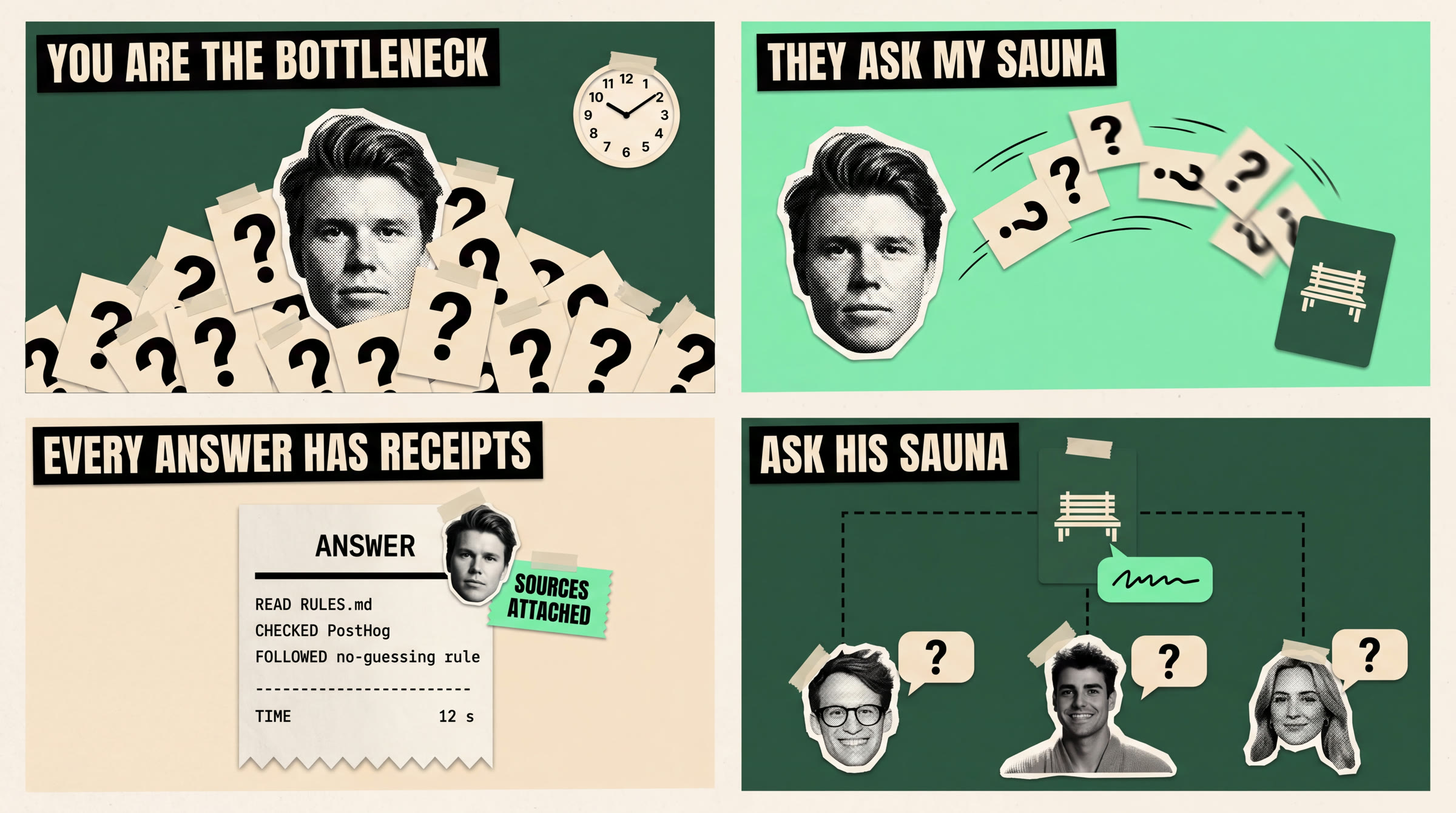
A 4-frame storyboard sheet laid out as a 2 by 2 grid of equal 16:9 panels with thin cream gutters, for an editorial paper-collage explainer video in the taped zine style. Palette only: deep forest green #003116, bright mint #93EFA4, warm cream #E7DFCC, black #171814. Characters are black-and-white halftone photo cutouts with rough white torn-paper borders and small tape strips: A is <<<ELEMENT_ID_A>>> (main character, face identical to reference, hair swept up, calm neutral closed-mouth expression), B is <<<ELEMENT_ID_B>>>, C is <<<ELEMENT_ID_C>>>, E is <<<ELEMENT_ID_E>>> (a woman). Extra-bold condensed sans-serif headline typography as cut paper strips. Flat matte paper, print dots, upper-left light shadows, no glow, no gloss. Panels in reading order:
1) deep green. A huge halftone head of A in the centre, half buried under a landslide of overlapping cream question cards, each card printed only with a large black question mark, cards piling up to his eyes. A small cream paper clock with black hands is taped in the top right corner. Headline strip across the top 'YOU ARE THE BOTTLENECK'.
2) mint. The same head of A on the left, now clear and calm. The question-mark cards are flying away from him in a curved stream toward a green card with a small cream sauna-bench glyph on the right, some cards mid-air with motion. Headline 'THEY ASK MY SAUNA'.
3) cream. One tall paper receipt in the centre, like a shop receipt with a zig-zag torn bottom edge, printed in black monospace: at the top 'ANSWER', then a thick line, then three lines: 'READ  RULES.md', 'CHECKED  PostHog', 'FOLLOWED  no-guessing rule', then a thick line. A small head of A is clipped to the receipt's top right corner. A mint chip beside it reads 'SOURCES ATTACHED'. Headline 'EVERY ANSWER HAS RECEIPTS'.
4) deep green. Small heads B, C and E in a row along the bottom, each with a cream speech bubble containing only a question mark, dashed lines up to one green sauna card at the top centre, and one mint answer bubble coming back down. Headline 'ASK HIS SAUNA'.
All text spelled exactly as written, clean and legible, nothing else printed anywhere.
The motion prompt
Every shot starts with the same visual and face rules, followed by a sentence describing what moves. The whole paper head can rock; its mouth must stay still.
Paper-collage animation of this exact frame. Camera locked: no zoom, no pan, no cuts. Every printed word stays exactly as printed, sharp and unchanged; no new text, letters or logos ever appear.

HARD RULE ON FACES: every human face is a still black-and-white printed paper cutout. Faces never change in any way: no mouth movement, no talking, no blinking, no eye movement, no expression change, no morphing. The only way a head expresses anything is as a whole rigid paper cutout that rocks left and right a few degrees like a quick head shake, or nods, or slides and settles. Everything else moves like flat cut paper being placed on a table: quick slides, small settles, slight rotation wobble, hard drop shadows.

The head cutout in the centre stays rigid and still. Question-mark cards keep piling in from the left and right edges, stacking higher against the head, each landing with a little paper bounce. The clock hands in the top right tick forward. Slightly frantic pace.
The diagram
We drew this frame in Python so every label stayed exact, then placed it alongside the generated shots.
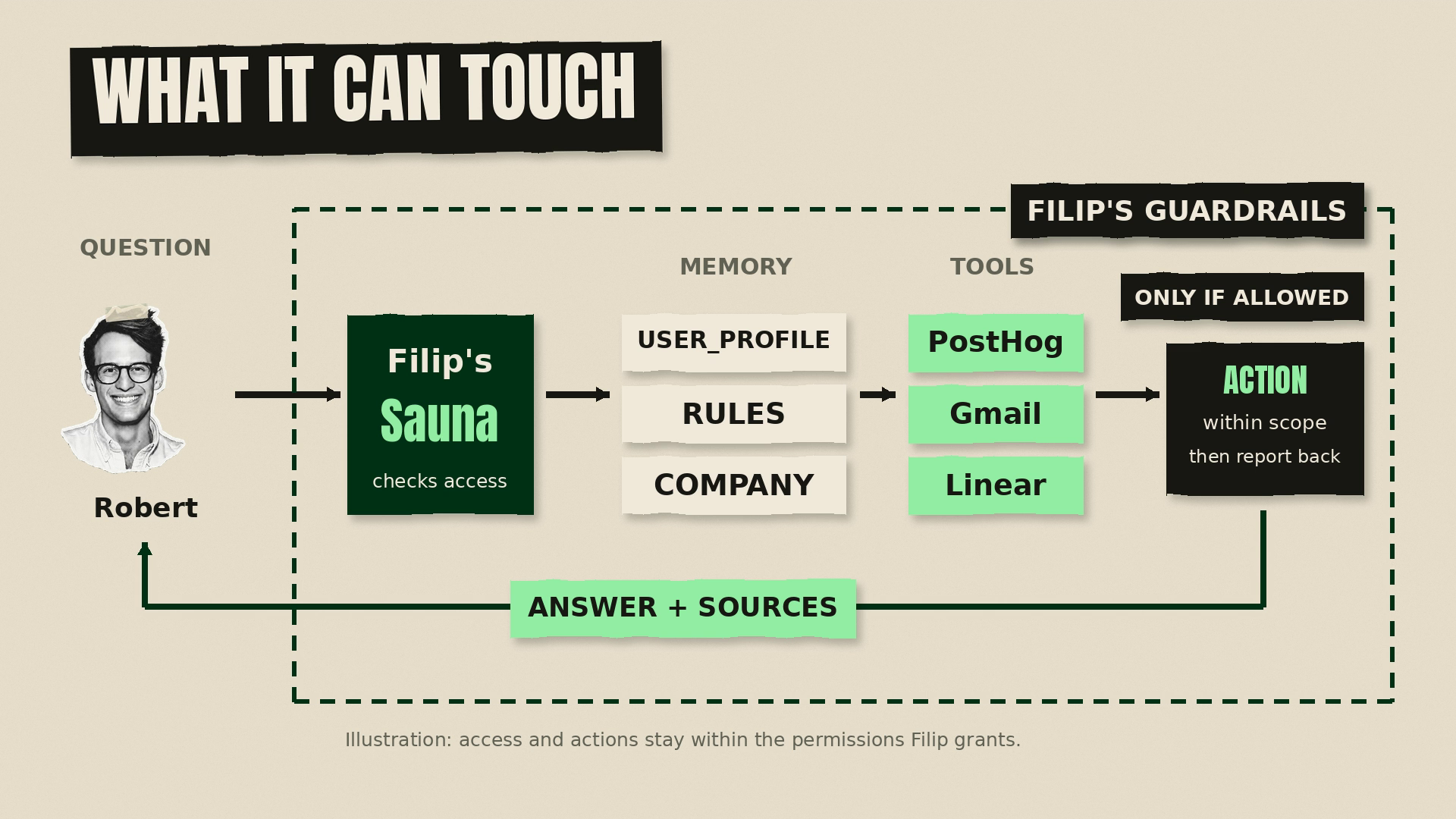
Download the reference compositor · Shot replacement script
These scripts are reference implementations from our original project; they depend on its other assets.
What we learned
Fix the script before rendering. Our rejected cuts mostly failed because we had not agreed the story. A wrong opening or an unnecessary section is quick to change in text and slow to change after generation.
Spend the revisions on the storyboard. On our account, a 4k storyboard cost 4 credits; a 13-second Seedance clip cost 117. You could redo the picture twenty-nine times for the cost of one clip. These were prices measured on September 9, 2026, not a quote for your next generation. Ask Sauna to check the cost first.
Check every printed word. In our same-frame comparison, Kling changed a word into a misspelling while Seedance kept it intact. We chose Seedance for the text-heavy shots. That is a result from our test, not a guarantee: inspect your own output, and draw diagrams and tables when their labels must be exact.
See the Seedance and Kling comparison
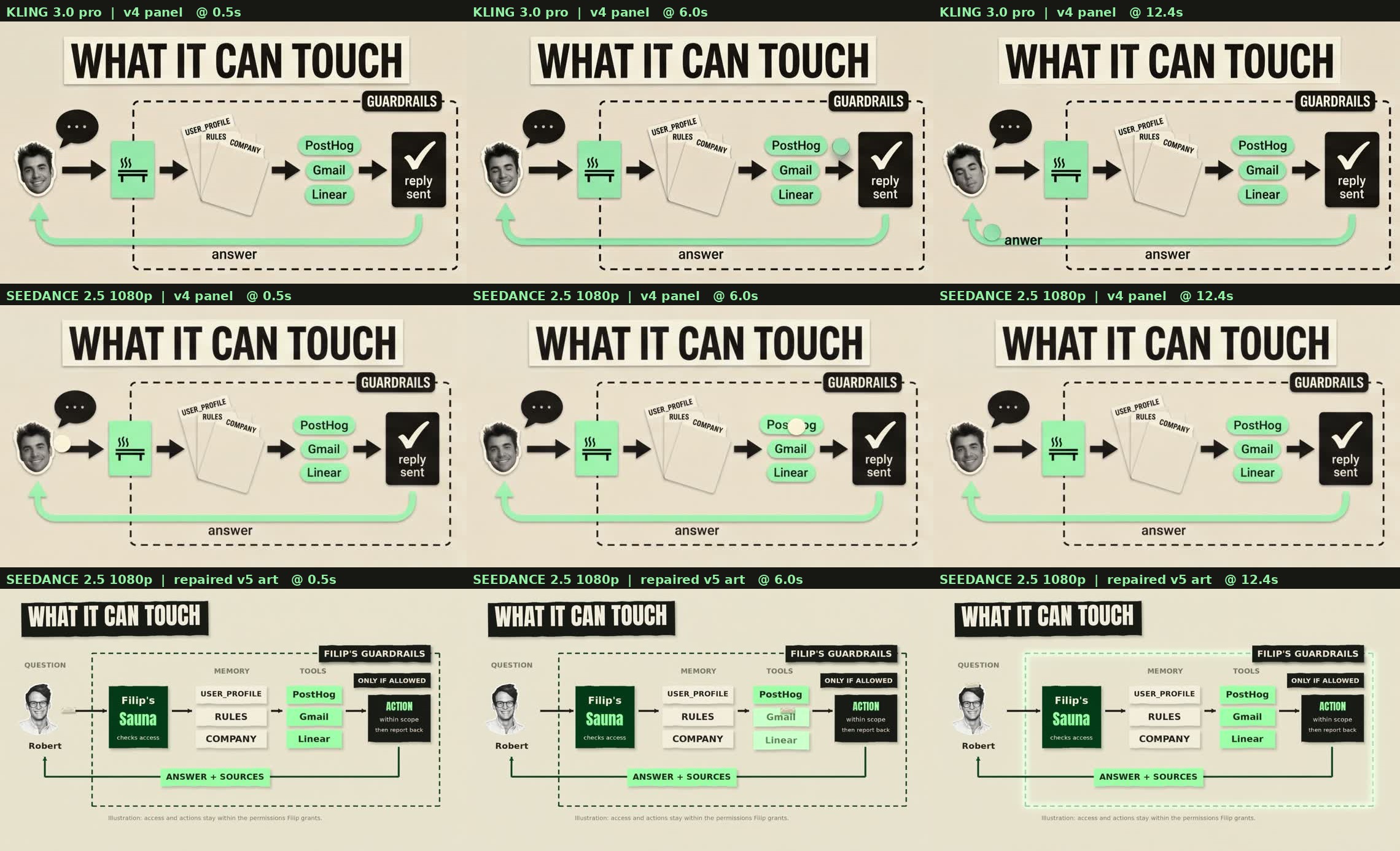
Check the soundtrack as well as the picture. Keep narration clear of scene boundaries and music below the voice. We caught missing words by transcribing the finished film. The skill includes these checks so you do not have to remember them every time.
Make your first film
Open Sauna, create your brand skill, paste the Higgsfield MCP link, and add the skill. Then give it a brief like this:
Make a short explainer about my company using the Higgsfield video skill. Start with what you already know about the product and ask me for anything missing. Show me the script first, then one storyboard. Check the generation cost before making the film.