# Sauna apps: UI and brand guide for agents
Version 0.4. Read this Markdown guide before creating a Sauna-native app. It is the written companion to the [UI and brand reference](https://sauna.ai/brand/apps): typography, colour, assets, components, navigation and task-specific interaction patterns. Use the shared visual language, then compose the interface around the work. The examples are reference implementations, not a released component package or a backend API.
The [review desk](https://sauna.ai/brand/apps/review) is a working example of this guide: seven kinds of jobs demonstrate how to review, edit and approve agent-created work on mobile and web. It exists to make the design rules concrete. It uses illustrative records saved in browser storage; approval records a local decision without sending, booking or buying.
## Start here
1. Read this guide for the UI and brand direction. The app reference uses a lighter expression of Sauna than the parent marketing brand: white surfaces, square controls and small, deliberate accents.
2. Load the [CSS tokens](https://sauna.ai/brand/apps/tokens.css) or [JSON tokens](https://sauna.ai/brand/apps/tokens.json); load the font stylesheet below separately. Use the exact asset URLs in this guide.
3. Choose only the [app patterns](https://sauna.ai/brand/apps#job-patterns) and [navigation](https://sauna.ai/brand/apps/navigation) the task needs. Home can collect work; a shared task link should open a focused, editable page.
4. Read the [jobs and interactions guide](https://sauna.ai/brand/apps/jobs-guide.md) when building email, calendar, document or approval workflows. Connect actual data and actions; label illustrative content honestly.
5. Check the result on a phone and a wide screen, with keyboard navigation and reduced motion. Verify the content, saved state and next action before adding decoration.
The main page is a guide for building apps, not an app template to copy wholesale. Its Interface, Foundations, Components, Patterns and Artwork sections demonstrate the principles below. The older /brand/apps/index exploration is archived; its palette and resources are not the current app defaults.
## Start with the work
Build an interface around the person's task and actual information. Lead with a useful result, readable evidence and a clear next action. Give content room to breathe; use compact rows when they make comparison easier. A list and detail view is often enough.
Studio borrows Sauna's identity lightly. Aim for editorial confidence, neutral working surfaces and deliberate typography. Explore layouts that suit each app: a reading view, review queue and research workspace need different structures. These defaults establish a common visual language, not a mandatory shell. Home can gather the available work; each task link should open into its own focused page. Explain the task briefly, then show the content in an editable reading surface or expandable rows. Counters, sidebars and multiple views are optional; add them only when the actual work needs them. Keep instructions for agents and implementation notes out of the finished product.
## Palette and geometry
| Token | Value | Use |
| --- | --- | --- |
| Background | #FFFFFF | White page canvas |
| Panel | #FFFFFF | White working surfaces |
| Surface | #F7F7F7 | Occasional neutral selection or secondary area |
| Ink | #181818 | Main text, primary buttons and focus outline |
| Secondary | #656565 | Supporting text and metadata |
| Border | #E5E5E5 | Fine decorative rules and separators |
| Control border | #767676 | Inputs and controls that need a visible boundary |
| Forest | #003116 | Selective primary action or approved state |
| Steel | #395C6C | Supporting links, source context and direction |
| Tangerine | #F5822B | Optional tiny accent, never a page wash |
| Tangerine deep | #A84B0B | Readable attention or review text on white |
| Danger | #B3261E | Errors, accompanied by explicit words |
Default to white, ink and neutral grey, with selective colour that helps the work. Primary actions normally use white text on Ink; Forest is a considered alternative for a meaningful review or completion action. Steel can identify source context and supporting links. A small Tangerine rule or mark can draw attention; use Tangerine deep for accompanying text on white. Always pair a status colour with words or a symbol. Keep page backgrounds white, avoid green washes, and do not colour every panel. Tangerine itself is unsuitable for normal text on white or white text on Tangerine; use Ink text over it.
Use square corners: 0px for buttons, inputs, tabs, panels and labels. No shadows. Separate sections with whitespace and fine horizontal rules before adding containers. Avoid nested cards, pills, ornamental badges and decorative charts. A 4px spacing base supports 8, 12, 16, 24, 32, 48 and 64px gaps.
Maintain at least 4.5:1 contrast for normal text and 3:1 for large text and meaningful control boundaries. Secondary text is intended for white or Surface backgrounds without reduced opacity. Border is a decorative separator; use Control border where a boundary is needed to identify a control, and an Ink outline for keyboard focus.
## Typography and brand cues
- Display: Instrument Serif, weight 400, 48–72px responsive, line-height 1.05. Reserve it for the main title and occasional editorial headings. A 32px section heading can use line-height 1.2.
- Reading and controls: Google Sans Flex with a neutral sans-serif fallback. Use 16px body text at 1.6 line-height and 14px controls at 1.4. Use weights 400, 500 and 600 for hierarchy.
- Technical identifiers: system monospace, 12px or larger. Ordinary labels and metadata use the body font.
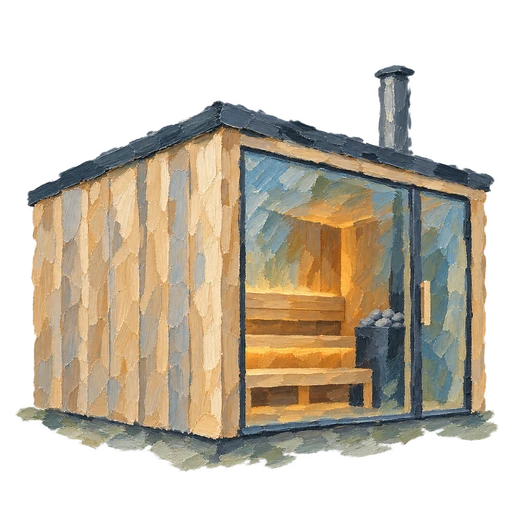
- Leave a trace of the human hand where a pause belongs. The transparent cedar sauna painting uses broad brushstrokes, broken edges and a small warm interior. Show it at roughly 88–176px with object-fit: contain; preserve transparency and proportions. A slow, faint smoke loop may accompany a genuine load; stop it when the work is ready and honour prefers-reduced-motion. Do not manufacture a delay. A reference specimen should include a pause control. Keep paintings out of tables, document text, error messages and primary controls. Tiny orientation marks can use a faint circular wash in Forest, Steel or clay. Keep search and code geometrically precise; texture must never make a useful symbol ambiguous. These accents are optional, not required on every page.
## Assets and artwork
Use the following direct, absolute URLs when building an app on another domain. A path beginning /brand/ resolves against the app's own host. On another domain, use these HTTPS URLs or copy the assets into its own public directory and update the paths. Do not point deployed apps at a developer's filesystem. The cedar sauna is the selected app painting; do not reintroduce the earlier forest variant or a landscape crop.
Use the original logos without recolouring, shadows or changed proportions. Give the mark clear space of at least half its height; use the logo at least 24px high or the wordmark at least 80px wide. Ink assets suit light backgrounds; white assets suit dark backgrounds. One modest brand placement is usually enough.
- Ink logo: https://sauna.ai/brand/svg/sauna-logo-ink.svg
- White logo: https://sauna.ai/brand/svg/sauna-logo-white.svg
- Ink wordmark: https://sauna.ai/brand/svg/sauna-wordmark-ink.svg
- White wordmark: https://sauna.ai/brand/svg/sauna-wordmark-white.svg
- Horizontal lockup: https://sauna.ai/brand/svg/sauna-lockup-horizontal-ink.svg
- Cedar sauna painting (transparent WebP): https://sauna.ai/brand/apps/sauna-cedar-v3.webp
The cedar image is a 512 × 512 WebP with transparency. Render it with an empty alt attribute when decorative. Smoke is a separate CSS/SVG animation, not part of the image or an animated file: the chimney opening is at 75.6% from the left and 13.2% from the top of the full square. The specimen uses a slow 5.4-second loop, a pause control, and static smoke for reduced motion. A static image is a valid choice. Preserve the whole square when positioning smoke.
The small functional marks are inline SVG components, not separate downloadable image files. Search and code use clean 2-unit strokes on a 48 × 48 viewBox. Other marks have only a slight irregularity. They render around 28–36px, with muted green (#456344), steel (#395C6C), clay (#A96535) or brown (#876349) and a faint circular wash. Use a text label for meaning; the wash and colour are decorative.
Example for an app hosted elsewhere:
```html

 ```
The visual reference includes working actions, input validation, explicit selection, keyboard state tabs, spacing, seven job patterns and artwork placement at https://sauna.ai/brand/apps. Explore the components rather than copying a whole page shell. The email pattern keeps the recipient, reason and personalized draft together; on a phone, moving between recipients is separate from Include and Skip decisions.
## Components and interaction
- Actions: one clear primary action, optional secondary action, and a real disabled state. Keep touch targets at least 44px. Use Ink or Forest for primary actions; use words alongside status colour.
- Editing: preview and editing share the reading surface. Keep labels available to assistive technology and make focus visible. Expand text fields to their content; avoid a separate editor that competes with the artifact.
- Inputs and selection: visible labels, feedback beside the field, explicit checkboxes for inclusion. Preserve entered text after errors. On phones, use at least 16px input text to avoid focus zoom.
- State specimens: Ready, Empty, Loading and Error show distinct situations. Loading refers to a real pending operation; empty and failure states explain what happened and offer a relevant next step.
- Tabs: a labelled tablist, associated panels and one active tab stop. Left/Right and Home/End move focus; Enter/Space selects. For route-level views, preserve state in the URL when useful.
- Spacing: a 4px base, 8–12px within controls, about 24px within a section and 48–64px between ideas. Fine rules and whitespace should do most of the grouping.
The page's compact specimen labels are not a prescription for small product text. Default to the reading and control sizes above, then adapt density to the actual content.
## App patterns
These are separate task pages. Begin with a short explanation of the overall job, followed by the editable work or expandable items and the relevant decision. The review Home gathers available work without invented metrics or required counters.
| Example | Purpose | Possible structure |
| --- | --- | --- |
| [Document review](https://sauna.ai/brand/apps/review/launch-brief) | Read a draft, adjust the wording, and approve a revision. | Expandable sections |
| [Email batch](https://sauna.ai/brand/apps/review/follow-up-emails) | Check the person, the reason, and the actual message together. | An editable message |
| [People & outreach](https://sauna.ai/brand/apps/review/people-outreach) | Choose a shortlist with useful context and verified profiles. | Selectable directory |
| [Meeting preparation](https://sauna.ai/brand/apps/review/meeting-brief) | Put the proposed event beside the agenda and preparation. | Event + briefing |
| [Purchase decision](https://sauna.ai/brand/apps/review/purchase-review) | Compare the evidence, criteria, and cost before choosing. | Options + decision |
| [Research synthesis](https://sauna.ai/brand/apps/review/research-brief) | Keep findings connected to sources and open questions. | Reading view + sources |
| [HTML artifact](https://sauna.ai/brand/apps/review/weekly-html) | Edit the actual page and the message that accompanies it. | Artifact + context |
For email batches, show the recipient, reason and exact personalized message together. A desktop list/detail view supports fast comparison. On a phone, previous/next controls and optional swiping move between messages; Include and Skip remain explicit decisions. Editing and preview use the same content. Style outgoing HTML with inline styles and email-safe fonts; the current export uses Arial/Helvetica, a white background and a fluid table capped at 600px. Do not put app controls or decorative loading artwork inside the outgoing email.
For meetings, keep title, date, time, explicit time zone, attendees and location beside the agenda. Preserve the same event details in review and calendar export. Calendar styling belongs to the app; an ICS file contains event data and does not carry the app's visual design. Approving a meeting does not by itself send an invitation.
For a large HTML artifact, edit the visible artifact in its isolated canvas. Keep any Slack or email delivery message beside it; show the real destination before an authorized send. The demo only saves local decisions and exports files.
Navigation is optional. Choose a workspace sidebar for many areas, top navigation for a few peers, local tabs for views of one object, breadcrumbs for hierarchy, queue/detail for a review sequence, or a mobile bottom bar for frequent destinations. A standalone task can need only a link back to Home. See the [navigation specimens](https://sauna.ai/brand/apps/navigation) and [implementation details](https://sauna.ai/brand/apps/jobs-guide.md#choose-the-navigation-that-fits).
## Useful patterns and honest behaviour
- Review queue: show a readable title, a source, concise context and an explicit status. Selecting a row reveals its detail and supporting evidence. Keep the decision next to that evidence. On narrow screens, provide a clear way back to the list.
- Information viewer: prioritize the material being read. Use a restrained contents list, metadata and source links when they help navigation. Avoid enclosing every paragraph in a card.
- States: distinguish no results, nothing needing review, loading and failure. Name the actual work in progress. Do not invent percentages, metrics, saved states or completed actions.
- Controls: implement the behaviour the label promises. Preserve entered work after errors. Offer retry or cancellation only when supported. Label preview interactions as local demonstrations when they do not save changes.
- Accessibility: use semantic HTML, labelled inputs, visible keyboard focus and text alongside status colours. Aim for 44px touch targets, announce meaningful state changes and restore focus after dialogs.
- Motion: use 160ms ease-out transitions only where they clarify interaction. Respect reduced-motion preferences. Avoid scroll choreography and entrances that delay reading. The optional sauna smoke is reserved for a genuine loading state or a clearly labelled, pausable specimen; use a static painting for reduced motion.
Build components intentionally; do not use shadcn templates. Fewer visible decisions, good proportions and clear language create the character. Keep room for creative choices within these principles.
## Standalone CSS example
This complete example loads the shared fonts and defines every variable it uses. Apply the classes to semantic HTML: a main element, an h1, a section for a review layout, a list with buttons for its rows, and an article for the selected detail. Use aria-current on the active item. Connect selection and actions to real behaviour. The mobile layout stacks the two areas; a larger app can instead use a dedicated detail screen with back navigation.
```css
@import url('https://fonts.googleapis.com/css2?family=Google+Sans+Flex:wght@400;500;600;700&family=Instrument+Serif:ital@0;1&display=swap');
:root {
--app-background: #FFFFFF;
--app-surface: #F7F7F7;
--app-ink: #181818;
--app-secondary: #656565;
--app-border: #E5E5E5;
--app-control-border: #767676;
--app-body: "Google Sans Flex", Inter, -apple-system, BlinkMacSystemFont, "Segoe UI", sans-serif;
--app-display: "Instrument Serif", Georgia, serif;
}
.studio-app, .studio-app * { box-sizing: border-box; }
.studio-app {
min-height: 100vh;
padding: clamp(20px, 4vw, 64px);
background: var(--app-background);
color: var(--app-ink);
font: 400 16px/1.6 var(--app-body);
}
.studio-app h1 {
margin: 0 0 32px;
font: 400 clamp(48px, 6vw, 72px)/1.05 var(--app-display);
}
.studio-app h2 { font: 500 20px/1.3 var(--app-body); }
.studio-app a { color: inherit; text-underline-offset: 3px; }
.studio-meta { color: var(--app-secondary); font-size: 14px; }
.studio-review { display: grid; border-top: 1px solid var(--app-border); }
.studio-list { margin: 0; padding: 0; list-style: none; }
.studio-row {
display: block;
width: 100%;
min-height: 44px;
padding: 20px 16px;
border: 0;
border-bottom: 1px solid var(--app-border);
border-radius: 0;
background: var(--app-background);
color: var(--app-ink);
font: inherit;
text-align: left;
cursor: pointer;
transition: background-color 160ms ease-out;
}
.studio-row:hover, .studio-row[aria-current="true"] { background: var(--app-surface); }
.studio-row[aria-current="true"] { border-left: 2px solid var(--app-ink); padding-left: 14px; }
.studio-detail { min-width: 0; padding: 24px 0; }
.studio-action, .studio-input {
min-height: 44px;
padding: 12px 16px;
border: 1px solid var(--app-control-border);
border-radius: 0;
box-shadow: none;
font: 500 14px/1.4 var(--app-body);
}
.studio-action {
border-color: var(--app-ink);
background: var(--app-ink);
color: var(--app-background);
cursor: pointer;
}
.studio-action:hover { text-decoration: underline; text-underline-offset: 3px; }
.studio-action:disabled { cursor: not-allowed; background: var(--app-secondary); }
.studio-input { width: 100%; background: var(--app-background); color: var(--app-ink); }
.studio-app :focus-visible { outline: 2px solid var(--app-ink); outline-offset: 3px; }
@media (min-width: 760px) {
.studio-review { grid-template-columns: minmax(220px, 1fr) minmax(0, 1.6fr); }
.studio-list { border-right: 1px solid var(--app-border); }
.studio-detail { padding: 24px 32px; }
}
@media (prefers-reduced-motion: reduce) { .studio-row { transition: none; } }
```
## Resources and source of truth
- Studio reference: https://sauna.ai/brand/apps
- This guide: https://sauna.ai/brand/apps/guide.md
- Review desk: https://sauna.ai/brand/apps/review
- Navigation patterns: https://sauna.ai/brand/apps/navigation
- Jobs implementation guide: https://sauna.ai/brand/apps/jobs-guide.md
- Machine-readable illustrative jobs: https://sauna.ai/brand/apps/examples.json
- CSS custom properties: https://sauna.ai/brand/apps/tokens.css
- Structured tokens: https://sauna.ai/brand/apps/tokens.json
- Parent brand and original assets: https://sauna.ai/brand
- Instrument Serif: https://fonts.google.com/specimen/Instrument+Serif
- Google Sans Flex: https://fonts.google.com/specimen/Google+Sans+Flex
During local preview, use the same paths on your local origin. The CSS token file defines variables and does not load fonts; use the fontStylesheet URL from the JSON or the import in the standalone example.
In this repository, lib/sauna-app-resources.ts supplies the same resource paths, selected assets and app patterns to the page and this guide; original logo names come from lib/brand.ts. lib/sauna-app-studio-design.ts generates the Markdown guide, CSS and JSON tokens. Copy guide on the page fetches this exact Markdown response. components/brand/apps/desk-elements.tsx and its CSS module implement editable text, small SVG marks and the cedar loading painting. Use the actual product's documented capabilities when implementing behaviour; this guide defines no backend endpoints or installation commands.
```
The visual reference includes working actions, input validation, explicit selection, keyboard state tabs, spacing, seven job patterns and artwork placement at https://sauna.ai/brand/apps. Explore the components rather than copying a whole page shell. The email pattern keeps the recipient, reason and personalized draft together; on a phone, moving between recipients is separate from Include and Skip decisions.
## Components and interaction
- Actions: one clear primary action, optional secondary action, and a real disabled state. Keep touch targets at least 44px. Use Ink or Forest for primary actions; use words alongside status colour.
- Editing: preview and editing share the reading surface. Keep labels available to assistive technology and make focus visible. Expand text fields to their content; avoid a separate editor that competes with the artifact.
- Inputs and selection: visible labels, feedback beside the field, explicit checkboxes for inclusion. Preserve entered text after errors. On phones, use at least 16px input text to avoid focus zoom.
- State specimens: Ready, Empty, Loading and Error show distinct situations. Loading refers to a real pending operation; empty and failure states explain what happened and offer a relevant next step.
- Tabs: a labelled tablist, associated panels and one active tab stop. Left/Right and Home/End move focus; Enter/Space selects. For route-level views, preserve state in the URL when useful.
- Spacing: a 4px base, 8–12px within controls, about 24px within a section and 48–64px between ideas. Fine rules and whitespace should do most of the grouping.
The page's compact specimen labels are not a prescription for small product text. Default to the reading and control sizes above, then adapt density to the actual content.
## App patterns
These are separate task pages. Begin with a short explanation of the overall job, followed by the editable work or expandable items and the relevant decision. The review Home gathers available work without invented metrics or required counters.
| Example | Purpose | Possible structure |
| --- | --- | --- |
| [Document review](https://sauna.ai/brand/apps/review/launch-brief) | Read a draft, adjust the wording, and approve a revision. | Expandable sections |
| [Email batch](https://sauna.ai/brand/apps/review/follow-up-emails) | Check the person, the reason, and the actual message together. | An editable message |
| [People & outreach](https://sauna.ai/brand/apps/review/people-outreach) | Choose a shortlist with useful context and verified profiles. | Selectable directory |
| [Meeting preparation](https://sauna.ai/brand/apps/review/meeting-brief) | Put the proposed event beside the agenda and preparation. | Event + briefing |
| [Purchase decision](https://sauna.ai/brand/apps/review/purchase-review) | Compare the evidence, criteria, and cost before choosing. | Options + decision |
| [Research synthesis](https://sauna.ai/brand/apps/review/research-brief) | Keep findings connected to sources and open questions. | Reading view + sources |
| [HTML artifact](https://sauna.ai/brand/apps/review/weekly-html) | Edit the actual page and the message that accompanies it. | Artifact + context |
For email batches, show the recipient, reason and exact personalized message together. A desktop list/detail view supports fast comparison. On a phone, previous/next controls and optional swiping move between messages; Include and Skip remain explicit decisions. Editing and preview use the same content. Style outgoing HTML with inline styles and email-safe fonts; the current export uses Arial/Helvetica, a white background and a fluid table capped at 600px. Do not put app controls or decorative loading artwork inside the outgoing email.
For meetings, keep title, date, time, explicit time zone, attendees and location beside the agenda. Preserve the same event details in review and calendar export. Calendar styling belongs to the app; an ICS file contains event data and does not carry the app's visual design. Approving a meeting does not by itself send an invitation.
For a large HTML artifact, edit the visible artifact in its isolated canvas. Keep any Slack or email delivery message beside it; show the real destination before an authorized send. The demo only saves local decisions and exports files.
Navigation is optional. Choose a workspace sidebar for many areas, top navigation for a few peers, local tabs for views of one object, breadcrumbs for hierarchy, queue/detail for a review sequence, or a mobile bottom bar for frequent destinations. A standalone task can need only a link back to Home. See the [navigation specimens](https://sauna.ai/brand/apps/navigation) and [implementation details](https://sauna.ai/brand/apps/jobs-guide.md#choose-the-navigation-that-fits).
## Useful patterns and honest behaviour
- Review queue: show a readable title, a source, concise context and an explicit status. Selecting a row reveals its detail and supporting evidence. Keep the decision next to that evidence. On narrow screens, provide a clear way back to the list.
- Information viewer: prioritize the material being read. Use a restrained contents list, metadata and source links when they help navigation. Avoid enclosing every paragraph in a card.
- States: distinguish no results, nothing needing review, loading and failure. Name the actual work in progress. Do not invent percentages, metrics, saved states or completed actions.
- Controls: implement the behaviour the label promises. Preserve entered work after errors. Offer retry or cancellation only when supported. Label preview interactions as local demonstrations when they do not save changes.
- Accessibility: use semantic HTML, labelled inputs, visible keyboard focus and text alongside status colours. Aim for 44px touch targets, announce meaningful state changes and restore focus after dialogs.
- Motion: use 160ms ease-out transitions only where they clarify interaction. Respect reduced-motion preferences. Avoid scroll choreography and entrances that delay reading. The optional sauna smoke is reserved for a genuine loading state or a clearly labelled, pausable specimen; use a static painting for reduced motion.
Build components intentionally; do not use shadcn templates. Fewer visible decisions, good proportions and clear language create the character. Keep room for creative choices within these principles.
## Standalone CSS example
This complete example loads the shared fonts and defines every variable it uses. Apply the classes to semantic HTML: a main element, an h1, a section for a review layout, a list with buttons for its rows, and an article for the selected detail. Use aria-current on the active item. Connect selection and actions to real behaviour. The mobile layout stacks the two areas; a larger app can instead use a dedicated detail screen with back navigation.
```css
@import url('https://fonts.googleapis.com/css2?family=Google+Sans+Flex:wght@400;500;600;700&family=Instrument+Serif:ital@0;1&display=swap');
:root {
--app-background: #FFFFFF;
--app-surface: #F7F7F7;
--app-ink: #181818;
--app-secondary: #656565;
--app-border: #E5E5E5;
--app-control-border: #767676;
--app-body: "Google Sans Flex", Inter, -apple-system, BlinkMacSystemFont, "Segoe UI", sans-serif;
--app-display: "Instrument Serif", Georgia, serif;
}
.studio-app, .studio-app * { box-sizing: border-box; }
.studio-app {
min-height: 100vh;
padding: clamp(20px, 4vw, 64px);
background: var(--app-background);
color: var(--app-ink);
font: 400 16px/1.6 var(--app-body);
}
.studio-app h1 {
margin: 0 0 32px;
font: 400 clamp(48px, 6vw, 72px)/1.05 var(--app-display);
}
.studio-app h2 { font: 500 20px/1.3 var(--app-body); }
.studio-app a { color: inherit; text-underline-offset: 3px; }
.studio-meta { color: var(--app-secondary); font-size: 14px; }
.studio-review { display: grid; border-top: 1px solid var(--app-border); }
.studio-list { margin: 0; padding: 0; list-style: none; }
.studio-row {
display: block;
width: 100%;
min-height: 44px;
padding: 20px 16px;
border: 0;
border-bottom: 1px solid var(--app-border);
border-radius: 0;
background: var(--app-background);
color: var(--app-ink);
font: inherit;
text-align: left;
cursor: pointer;
transition: background-color 160ms ease-out;
}
.studio-row:hover, .studio-row[aria-current="true"] { background: var(--app-surface); }
.studio-row[aria-current="true"] { border-left: 2px solid var(--app-ink); padding-left: 14px; }
.studio-detail { min-width: 0; padding: 24px 0; }
.studio-action, .studio-input {
min-height: 44px;
padding: 12px 16px;
border: 1px solid var(--app-control-border);
border-radius: 0;
box-shadow: none;
font: 500 14px/1.4 var(--app-body);
}
.studio-action {
border-color: var(--app-ink);
background: var(--app-ink);
color: var(--app-background);
cursor: pointer;
}
.studio-action:hover { text-decoration: underline; text-underline-offset: 3px; }
.studio-action:disabled { cursor: not-allowed; background: var(--app-secondary); }
.studio-input { width: 100%; background: var(--app-background); color: var(--app-ink); }
.studio-app :focus-visible { outline: 2px solid var(--app-ink); outline-offset: 3px; }
@media (min-width: 760px) {
.studio-review { grid-template-columns: minmax(220px, 1fr) minmax(0, 1.6fr); }
.studio-list { border-right: 1px solid var(--app-border); }
.studio-detail { padding: 24px 32px; }
}
@media (prefers-reduced-motion: reduce) { .studio-row { transition: none; } }
```
## Resources and source of truth
- Studio reference: https://sauna.ai/brand/apps
- This guide: https://sauna.ai/brand/apps/guide.md
- Review desk: https://sauna.ai/brand/apps/review
- Navigation patterns: https://sauna.ai/brand/apps/navigation
- Jobs implementation guide: https://sauna.ai/brand/apps/jobs-guide.md
- Machine-readable illustrative jobs: https://sauna.ai/brand/apps/examples.json
- CSS custom properties: https://sauna.ai/brand/apps/tokens.css
- Structured tokens: https://sauna.ai/brand/apps/tokens.json
- Parent brand and original assets: https://sauna.ai/brand
- Instrument Serif: https://fonts.google.com/specimen/Instrument+Serif
- Google Sans Flex: https://fonts.google.com/specimen/Google+Sans+Flex
During local preview, use the same paths on your local origin. The CSS token file defines variables and does not load fonts; use the fontStylesheet URL from the JSON or the import in the standalone example.
In this repository, lib/sauna-app-resources.ts supplies the same resource paths, selected assets and app patterns to the page and this guide; original logo names come from lib/brand.ts. lib/sauna-app-studio-design.ts generates the Markdown guide, CSS and JSON tokens. Copy guide on the page fetches this exact Markdown response. components/brand/apps/desk-elements.tsx and its CSS module implement editable text, small SVG marks and the cedar loading painting. Use the actual product's documented capabilities when implementing behaviour; this guide defines no backend endpoints or installation commands.